 PT
PT
Pomodoro Timer
1A Pomodoro timer in your menu bar
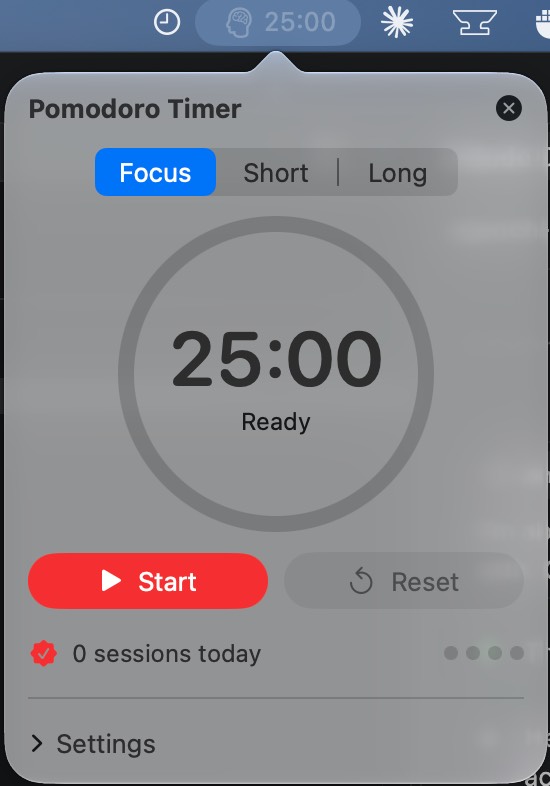
Pomodoro Timer lives in your menu bar and keeps a live countdown there, so you can see how much time is left in your focus session or break without switching windows. Click the menu bar item to open the controls: start, pause, resume, or reset the timer, and switch between Focus, Short Break, and Long Break. A progress ring shows how far along you are and what time the session will end. Right-click the menu bar item for a quick Start/Pause, Reset, and Quit menu. Features • Live countdown and phase icon in the menu bar • Customizable focus, short break, and long break lengths (defaults: 25 / 5 / 15 minutes) • Choose how many focus sessions come before a long break • Optional auto-start for the next phase • Notification and sound when a phase ends, with eight sounds to choose from (or none) • A count of sessions completed today, with dots showing progress toward your next long break • Keeps accurate time through sleep and wake • Remembers your settings between launches Pomodoro Timer works entirely on your Mac. There is no account, no network access, and no data collection. It only asks for permission to send notifications.
Permissions
Versions
Version 2 Oct 24, 2026 Current
- Published
- Oct 24, 2026
- App Type
- Menu Bar App
- Permissions
- Incoming connections (server)
- License
- MIT License
- Runtime
- ironsmith-0.0.0
- Source Hash
- f86f0ca8caedaa46f14c167c239a7e5e5dab6033fbb90c049993a086e7b78ec5
Version 1 Oct 23, 2026
- Published
- Oct 23, 2026
- App Type
- Menu Bar App
- Permissions
- Incoming connections (server), Internet access, User-selected files, Microphone, Camera, Location
- License
- MIT License
- Runtime
- ironsmith-0.0.0
- Source Hash
- 4a47d2c33c5a812c5ac4c8e50065cd15f1fcd2c493d4bbb971f20e6c9c71d908